
Pings Aren't Approvals: ntfy, Pushover, Slack & NotiBuddy
Compare ntfy, Pushover, Slack, and NotiBuddy for AI agent approvals: NAT traversal, E2EE, diffs, and Face ID exit codes.
Almost every developer running unattended Claude Code sessions, Cursor tasks, or deploy scripts tries the same five-minute hack first: pipe a curl call into ntfy.sh, Pushover, or a Slack incoming webhook so your phone buzzes when the terminal stops.
It works until your phone buzzes in line for coffee with Claude Code paused on: psql $PROD_URL -f migration_042.sql. You can see the process is blocked behind your laptop’s NAT, and you still have no safe, verified way to answer it without walking back to your keyboard.
That gap isn’t a missing flag in your curl command—a notification ping and an execution approval are opposite primitives. Push tools broadcast fire-and-forget text, whereas NotiBuddy (notibuddy@^0.4.4) pairs a local CLI and MCP server with a native iPhone, iPad, and Apple Watch app to deliver end-to-end encrypted prompts and wait for an on-device cryptographic signature (plus Face ID for risky actions) before exiting 0.
Why a notification ping is the opposite of an approval
A push notification is fire-and-forget broadcast: your script emits text, a relay fans it out, and your process moves on—so a delayed or dropped alert never runs anything dangerous. An execution approval is blocking, fail-closed settlement between one waiting process and one authorized human.
Turning an alert into a real approval flips four requirements at once:
- Your process has to wait behind NAT: A coding agent on your laptop or a job on a private CI runner usually has no public IP address for your phone to call back.
- The reply carries execution authority: Once tapping Approve runs
terraform apply, promotes a release, or lets an agent edit 30 files, any unauthenticated callback topic or shared URL becomes a remote execution surface. - Context has to be readable on a phone: Approving a blind
"Proceed? [y/n]"banner without inspecting the actual code diff or checklist trains you to rubber-stamp mistakes. - Silence must always mean no: Network drops, expired prompts, or a dismissed banner must return a non-zero exit code—never slip past
&&orset -e.
Side-by-side: what it takes to pause a local script for approval
Pausing a local script behind NAT with ntfy or Pushover requires wiring your own public callback endpoint or polling loop without end-to-end encryption, while Slack requires running a workspace bot daemon. NotiBuddy handles outbound NAT polling, end-to-end encryption, and Face ID verification in a single CLI command (nb gate).
1. The ntfy path (HTTP actions + your own return channel)
ntfy is hard to beat for one-way shell alerts, and it supports up to three http, view, or copy action buttons on iOS and Android (broadcast intents are Android-only):
curl -H "Title: Run prod migration?" \
  -H "Actions: http, Approve, https://tunnel.example.com/approve, method=POST; http, Abort, https://tunnel.example.com/abort, method=POST" \
  -d "042_drop_legacy_tokens.sql" \
  https://ntfy.sh/my-secret-topic
Sending the alert takes five seconds. Getting the answer back to a waiting script on your laptop is where the custom plumbing starts:
- You build the return path and auth: Either you expose a local HTTP listener to the internet (via Cloudflare Tunnel, Tailscale Funnel, or a VPS) and validate auth headers yourself, or the button posts
"approved"to a secondntfytopic your script polls—where anyone who learns the topic name can spoof a reply. - Plaintext on the relay:
ntfy.shcaches message bodies and action headers (including bearer tokens embedded inActions:) in plaintext. Even if you self-hostntfy, instant background delivery on iOS still routes wakeup pings throughntfy.shviaupstream-base-url. - No device signature or Face ID: Tapping an unlocked notification banner fires the HTTP POST immediately.
2. The Pushover path (emergency-priority callbacks)
Pushover is rock-solid for one-way alerts, and its mobile apps intentionally omit custom [Approve] / [Reject] action buttons and inline text inputs. Its native callback flow uses Emergency Priority (priority=2), repeating an alarm every retry seconds until acknowledged and POSTing to a publicly reachable callback URL—giving you a “seen” receipt rather than a two-choice decision, with no E2EE or cryptographic callback signature.
3. The Slack path (Slack App + Socket Mode daemon)
Slack solves local NAT cleanly if you enable Socket Mode, because your script opens an outbound WebSocket instead of exposing an inbound port. The tradeoff is bot ceremony and workspace visibility:
- You create a Slack App, enable Interactivity and Socket Mode, manage both an app-level token (
xapp-...) and a bot token (xoxb-...), and run a persistent listener to correlateblock_actionsclicks back to your waiting script. - Every prompt, file path, and diff is stored in your Slack workspace in plaintext under your workspace’s retention settings (and Block Kit text blocks cap at 3,000 characters, so longer diffs require file uploads or split blocks).
- Clicking Approve in Slack proves only that an active Slack session clicked the button—an unlocked laptop or phone screen never steps up to Face ID.
4. The NotiBuddy path (one-way pings and fail-closed gates in one CLI)
In NotiBuddy (iOS/iPadOS 17+), you create a one-time 10-minute setup code (Connect → Add a connection → Create setup code → Share Setup) and pair once on your Mac (Node.js 20+) via pbpaste | npx -y notibuddy@^0.4.4 pair --to personal, saving your keys in ~/.notibuddy/ (for remote CI runners, see the GitHub Actions guide). After pairing, the same tool handles both instant one-way alerts (nb notify) and blocking approvals (nb gate) with zero tunnels, bot tokens, or accounts:
# Instant one-way E2EE alert (returns immediately, like ntfy/Pushover):
npx -y notibuddy@^0.4.4 notify "Build finished" --to personal --message "All checks passed."

# Blocking Face ID approval gate (waits for your signed reply):
npx -y notibuddy@^0.4.4 gate "Apply 042_drop_legacy_tokens.sql?" \
  --to personal \
  --message "Prod replica lag: 40 ms · backup verified" \
  --approve "Run migration" \
  --reject "Abort" \
  --requires-auth \
  --timeout 600
Your computer encrypts the prompt end-to-end, sends the sealed envelope out over HTTPS, and polls while your process stays running. On your paired iPhone or iPad, tapping Run migration requires Face ID (or Touch ID), signs the decision on-device, and returns an encrypted reply verified locally against your paired device key before exiting:
- Exit
0— Approved and Face ID confirmed on your paired iPhone or iPad - Exit
2— Rejected (or Face ID canceled/unauthenticated) - Exit
3— Timed out after 600 seconds with no answer - Exit
1— Operational or network error
Silence never ships code. Only exit
0lets&&orset -eproceed.
How ntfy, Pushover, Slack, and NotiBuddy compare
ntfy and Pushover focus on one-way alert delivery across Android and iOS, while Slack focuses on shared team channel chat. On iPhone, iPad, and Apple Watch, NotiBuddy covers those everyday one-way alerts and rich status cards plus blocking, end-to-end encrypted approvals behind NAT with native code diffs and Face ID exit codes.
| Capability | ntfy | Pushover | Slack | NotiBuddy |
|---|---|---|---|---|
| Scope | One-way pub/sub alerts | One-way alerts & paging | Team chat & shared ops | E2EE alerts, live timers & approvals |
| Works behind local NAT | Needs tunnel or 2nd topic | Needs public callback URL | Yes (via Socket Mode bot) | Yes (built-in outbound poll) |
| Who can read payloads | Server (unless self-hosted) | Pushover servers | Slack workspace & cloud | Only your devices (E2EE) |
| Approve / Reject + screens | Up to 3 HTTP/URL buttons | Emergency ack or URL link | Block Kit buttons & modals | Buttons, forms, text & screens |
| Proof of replying device | None (custom headers only) | Shared URL secret only | Active Slack login | On-device cryptographic signature |
| Per-action Face ID / Touch ID | No | No | No | Yes on iPhone/iPad (--requires-auth) |
| Inline code diffs | Plain text | Plain text | 3,000-char blocks (or file upload) | Native line-by-line diff view |
| Native MCP & Claude hook | Community wrappers | Community wrappers | Custom bot / third-party | Official MCP + nb hook claude |
| Account & base cost | No account · Free / paid | Account · $5 once / OS | Workspace (Free / paid) + tokens | No account · Free (5/24h) or Pro |
Context matters: reviewing real diffs instead of blind banners
Security isn’t just verifying who tapped Approve—it’s making sure you could actually read what was about to run. Instead of squeezing patches into plain-text push banners, NotiBuddy renders native SwiftUI code diffs, checklists, KPI strips, and Face ID action gates on your iPhone or iPad (iOS/iPadOS 17+) while keeping every payload end-to-end encrypted.
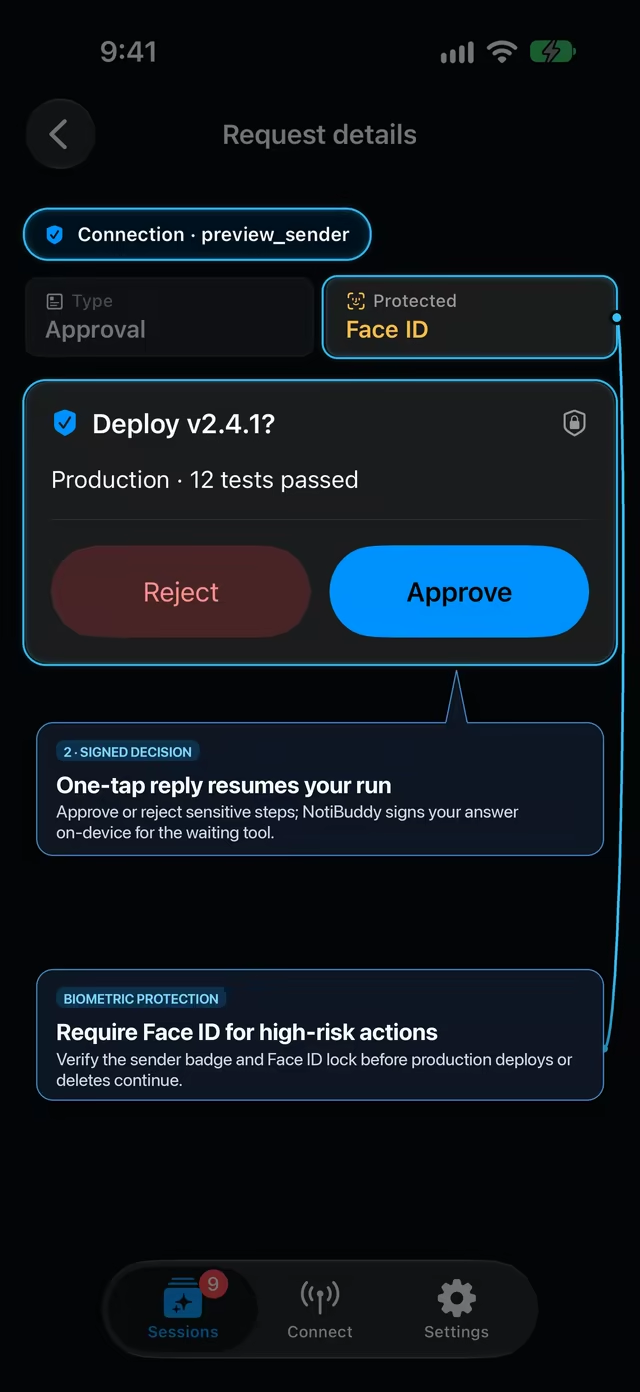
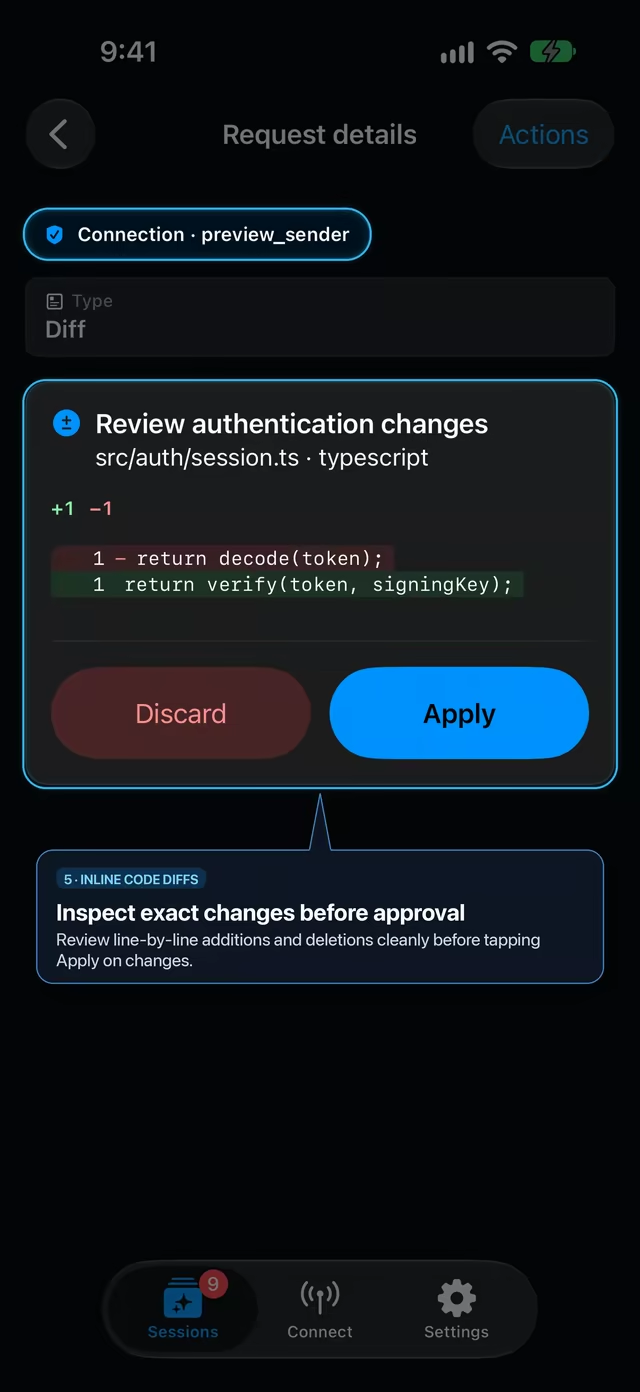
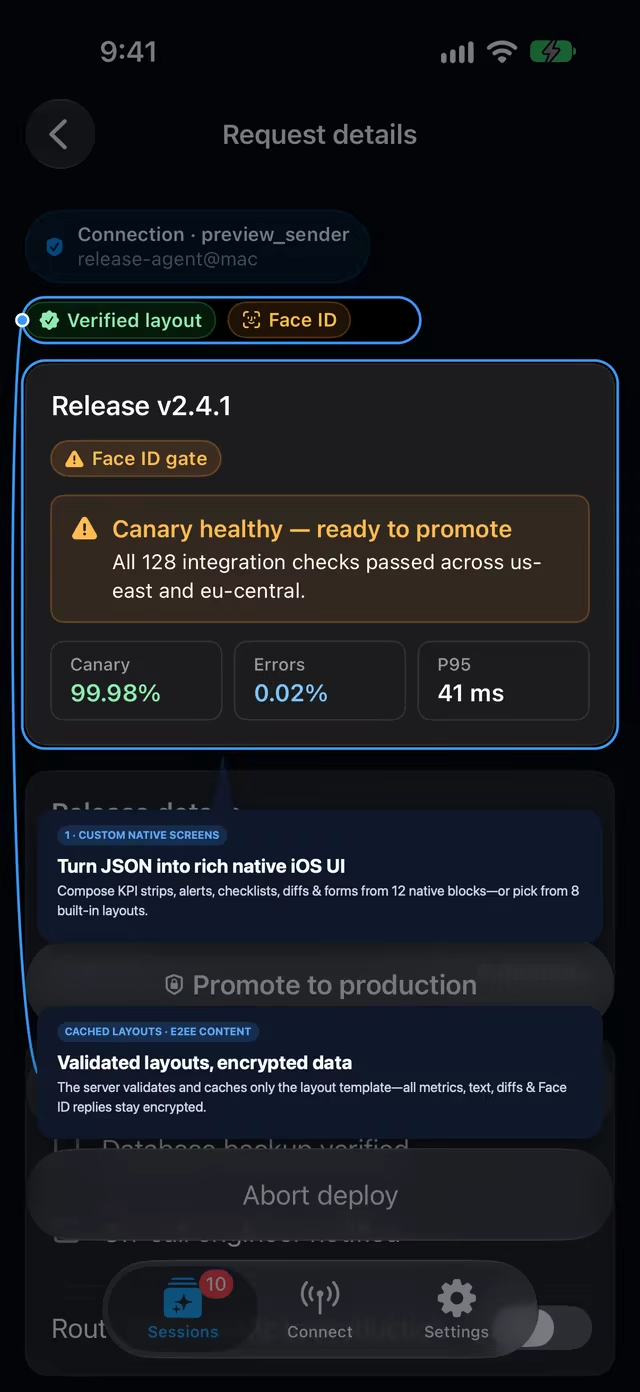
From a local MCP server (npx -y notibuddy@^0.4.4 mcp --to personal), hosted OAuth 2.1 MCP (https://mcp.notibuddy.app/mcp), or the CLI, your workflow can send:
- Line-by-line code diffs (
diff/--diff): Inspect exact SQL, config, or source patches before approving. - Custom Native Screens: Populate 8 certified templates (including
deployment_gate,db_migration_approval, andincident_triage) or compose 12 SwiftUI blocks—KPI strips, checklists, forms, alerts, and Face ID buttons. - 10-second keyboard grace for Claude Code (
nb hook claude PermissionRequest): Withnbinstalled globally (brew install yourbit-network/tap/notibuddyornpm i -g notibuddy@^0.4.4), prompts wait 10 seconds for a local answer at your keyboard before forwarding unanswered permission requests to your phone with Lock Screen previews hidden by default. - Live Activities & Apple Watch: Track long test suites or multi-step runs on your Lock Screen, Dynamic Island, and Apple Watch (
watchOS 10+) vianotibuddy_activity, where progress updates and ends don’t consume extra free-tier requests. (Apple Watch displays notifications and Live Activities; full Custom Native Screens and Face ID run on iPhone and iPad, and your computer or CI runner must stay awake to receive replies.)
Which tool should you pick?
If you use an iPhone, iPad, or Apple Watch, NotiBuddy already covers most of what developers wire up ntfy, Pushover, or solo Slack bots to do—instant one-way build and cron alerts (nb notify), rich KPI digest cards (kpi_status_card), interactive forms, and Lock Screen Live Activities—while adding end-to-end encryption and signed approvals (nb gate) when a run actually needs an answer.
That makes the real choice mostly about devices and team shape:
- Use
ntfywhen you need Android or Linux receivers, or you want a self-hosted open-source pub/sub bus on your own server. - Use
Pushoverwhen you need Android + iOS alerts with repeating siren-style emergency paging (priority=2) for a $5 one-time fee. - Use
Slackwhen multiple teammates need to discuss, comment on, and coordinate a release together inside a shared chat channel. - Use
NotiBuddywhen you want one private, native Apple app for the whole loop—encrypted one-way pings, Live Activity progress on your Lock Screen and Apple Watch, and inline code diffs, Custom Native Screens, and fail-closed Face ID approvals on your iPhone and iPad.
NotiBuddy is free to start on the App Store (five requests per rolling 24 hours with every feature unlocked; Pro Annual is $11.99/year with a 2-week trial, and Pro Lifetime is $39.99 once).
Ready to wire it into your stack in about a minute? Jump straight to the runbook for Claude Code, Cursor, OpenAI Codex, Google Antigravity, GitHub Actions, or shell scripts—or read the full setup & CLI reference.