
Crea una clave dedicada para CI
Vincula una conexión aparte con npx -y notibuddy@^0.4.0 pair --to ci --label "GitHub Actions" y comprueba con doctor --to ci para revocarla por separado desde Conectar.
GitHub Actions y CI/CD · CLI cifrada
Agrega un paso de la CLI de NotiBuddy en GitHub Actions para recibir aprobaciones cifradas y avisos de compilación directo en tu iPhone—sin bots de Slack ni cuentas.
Recomendado · 30 segundos
Tu agente leerá /github-actions.md, te guiará para crear una clave dedicada de CI y agregará un paso de aprobación con fallo cerrado.
Agrega aprobaciones de despliegue con NotiBuddy al workflow de GitHub Actions de este repo usando https://notibuddy.app/github-actions.md (notibuddy@^0.4.0). Guíame para vincular una clave dedicada de CI en mi propia Terminal, indícame qué GitHub Secret guardar y agrega el paso con `nb gate` y fallo cerrado.Tu agente leerá las instrucciones detalladas en notibuddy.app/github-actions.md (Markdown sin formato, en inglés).
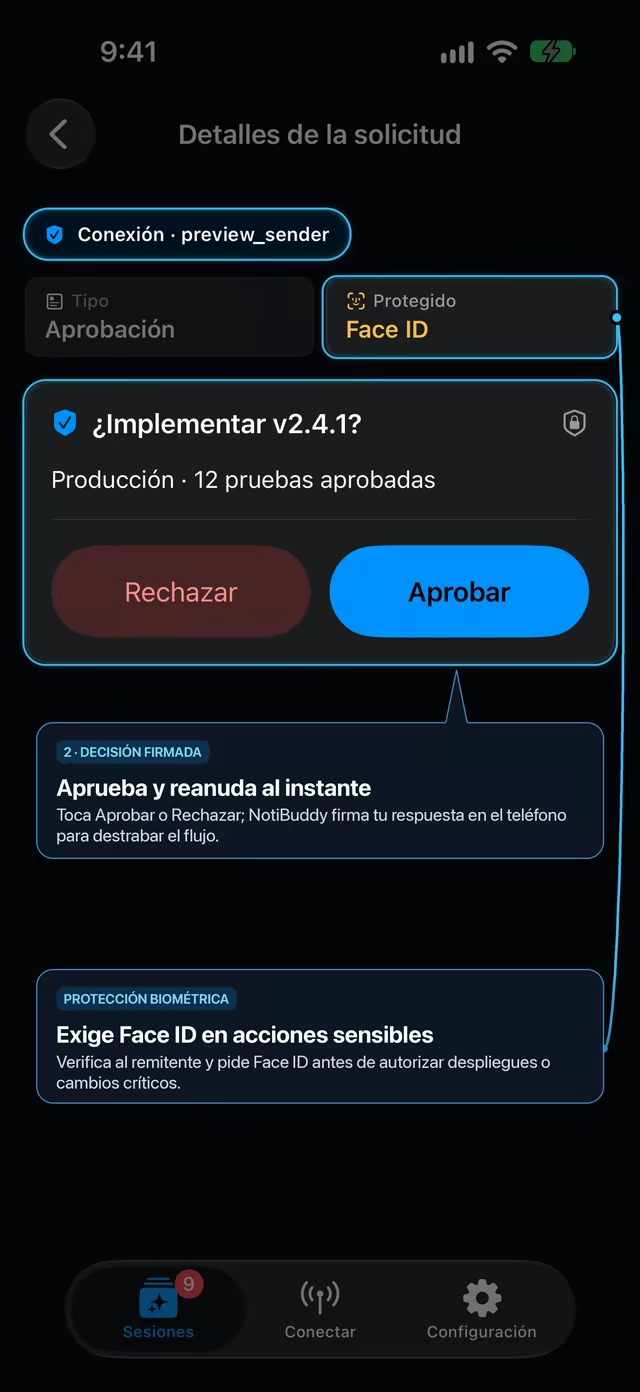
Vincula una clave dedicada para CI una vez, guarda su JSON en un Secret de un Environment protegido (NOTIBUDDY_CI_DESTINATION) y agrega esta compuerta con Face ID y fallo cerrado:
- name: Configurar Node.js
  uses: actions/setup-node@v4
  with:
    node-version: '20'

- name: Pedir aprobación con Face ID en iPhone
  shell: bash
  timeout-minutes: 15
  env:
    NOTIBUDDY_DEST_JSON: ${{ secrets.NOTIBUDDY_CI_DESTINATION }}
    APPROVE_OPTION: Aprobar
    DECLINE_OPTION: Rechazar
    TIMEOUT_SECONDS: '600'
    REF_NAME: ${{ github.ref_name }}
    COMMIT_SHA: ${{ github.sha }}
    REPO_NAME: ${{ github.repository }}
    ACTOR: ${{ github.actor }}
    RUN_URL: ${{ github.server_url }}/${{ github.repository }}/actions/runs/${{ github.run_id }}
  run: |
    set -euo pipefail
    if [ -z "$NOTIBUDDY_DEST_JSON" ]; then
      echo "::error::Falta el secret NOTIBUDDY_CI_DESTINATION."
      exit 1
    fi

    umask 077
    export NOTIBUDDY_HOME="${RUNNER_TEMP:-/tmp}/notibuddy-$$"
    NB_PREFIX="${RUNNER_TEMP:-/tmp}/notibuddy-cli-$$"
    trap 'rm -rf "$NOTIBUDDY_HOME" "$NB_PREFIX"' EXIT

    mkdir -p "$NOTIBUDDY_HOME/destinations" "$NB_PREFIX"
    printf '%s' "$NOTIBUDDY_DEST_JSON" > "$NOTIBUDDY_HOME/destinations/ci.json"
    npm --prefix "$NB_PREFIX" install --no-save --silent notibuddy@^0.4.0 >/dev/null

    "$NB_PREFIX/node_modules/.bin/nb" gate "¿Desplegar ${REF_NAME}?" \
      --to ci \
      --sender "GitHub Actions" \
      --message "${REPO_NAME} · ${COMMIT_SHA:0:7} por ${ACTOR} · ${RUN_URL}" \
      --approve "${APPROVE_OPTION}" \
      --reject "${DECLINE_OPTION}" \
      --requires-auth \
--timeout "${TIMEOUT_SECONDS}"Usa nb notify sin --options para enviar una notificación cifrada en un solo sentido sin consumir minutos esperando:
- name: Avisar en iPhone si falla el workflow
  if: failure()
  shell: bash
  env:
    NOTIBUDDY_DEST_JSON: ${{ secrets.NOTIBUDDY_CI_DESTINATION }}
    REF_NAME: ${{ github.ref_name }}
    REPO_NAME: ${{ github.repository }}
    RUN_URL: ${{ github.server_url }}/${{ github.repository }}/actions/runs/${{ github.run_id }}
  run: |
    set -euo pipefail
    umask 077
    export NOTIBUDDY_HOME="${RUNNER_TEMP:-/tmp}/notibuddy-$$"
    NB_PREFIX="${RUNNER_TEMP:-/tmp}/notibuddy-cli-$$"
    trap 'rm -rf "$NOTIBUDDY_HOME" "$NB_PREFIX"' EXIT
    mkdir -p "$NOTIBUDDY_HOME/destinations" "$NB_PREFIX"
    printf '%s' "$NOTIBUDDY_DEST_JSON" > "$NOTIBUDDY_HOME/destinations/ci.json"
    npm --prefix "$NB_PREFIX" install --no-save --silent notibuddy@^0.4.0 >/dev/null
    "$NB_PREFIX/node_modules/.bin/nb" notify "Falló CI en ${REF_NAME}" \
      --to ci \
      --sender "GitHub Actions" \
--message "${REPO_NAME} · ${RUN_URL}"Vincula una conexión aparte con npx -y notibuddy@^0.4.0 pair --to ci --label "GitHub Actions" y comprueba con doctor --to ci para revocarla por separado desde Conectar.
Guarda el contenido completo de ~/.notibuddy/destinations/ci.json como NOTIBUDDY_CI_DESTINATION en un Environment con reglas de rama. Puedes borrar el archivo local después, pero no desconectes esa clave en tu iPhone.
nb gate maneja la espera en múltiples ventanas con un solo request ID firmado hasta --timeout y solo sale con código 0 si recibe una aprobación verificada con Face ID (2 al rechazar o faltar autenticación, 3 al vencer, 1 por error).
Usa nb notify --screen (o nb gate --requires-auth) para revisar métricas canary, listas previas y detalles del commit en tu iPhone antes de promover a producción.
Envía el resumen del plan o el diff del esquema a tu teléfono antes de correr terraform apply.
Omite --options para enviar un aviso cifrado en cuanto termine o falle un pipeline largo.
Vincula un solo iPhone con varios agentes, editores, runners de CI y scripts, cada uno con su propia clave revocable.